- have any questions?
- 03431105283


How Does Web Hosting Work? A Beginner’s Guide + Tips

Mastering WordPress Performance Optimization with Hostinger
January 27, 2025
10 Must-Know Web Hosting Terms Explained
May 10, 2025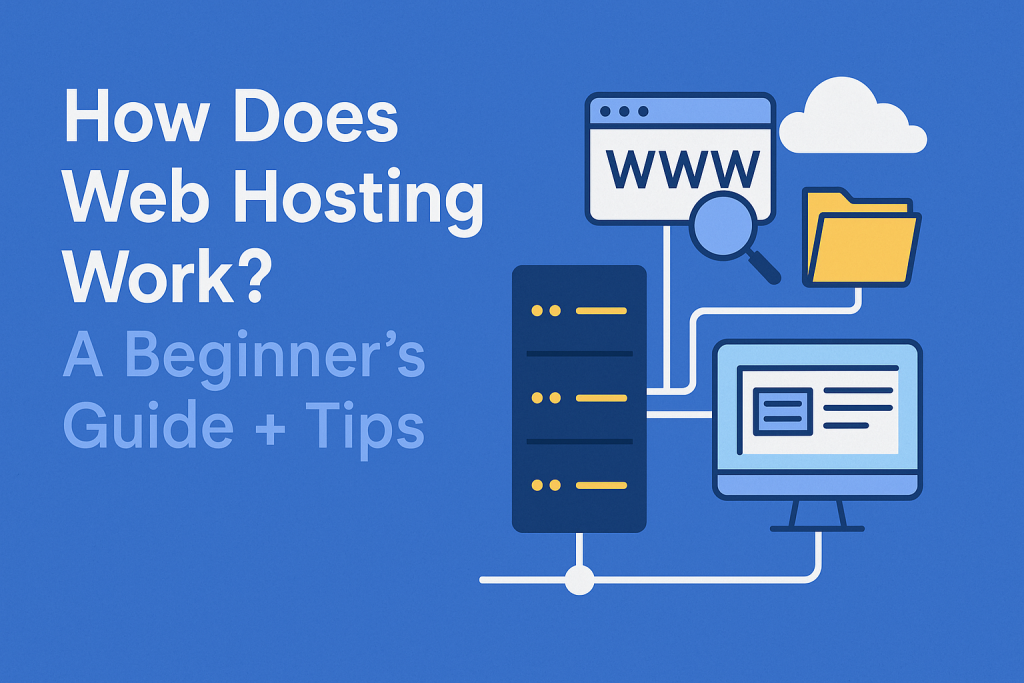
What Is Web Hosting?
Web hosting is a service that allows individuals and businesses to make their websites accessible on the internet. When you create a website, all its files (like text, images, and code) must be stored on a server—a powerful computer always connected to the internet. A web hosting provider rents out space on these servers so your website can be viewed by visitors worldwide.
Why Do You Need Web Hosting?
Without web hosting, your website wouldn’t be available online. Here’s why it’s essential:
- Store’s Website Files – Hosting keeps all your website data in one secure place.
- Ensures Uptime – Reliable hosting ensures your site is available 24/7.
- Provides Bandwidth – It determines how much traffic your site can handle.
- Offers Security – Good hosts protect your site from hackers and malware.
How Does Web Hosting Work?
When someone types your website’s address (like gethostinger.com) into their browser, their computer connects to the server where your site is hosted. The server then sends your website’s files back to the user’s device, allowing them to see your site.
Key Components of Web Hosting
1. Server Types
Different websites need different types of hosting servers:
- Shared Hosting – Multiple websites share one server (affordable but slower).
- VPS Hosting – A virtual private server offers more power than shared hosting.
- Dedicated Hosting – An entire server is dedicated to your website (best for large sites).
- Cloud Hosting – Uses multiple servers for better reliability and scalability.
2. Domain Name Connection
Your domain name (e.g., yourwebsite.com) is like your website’s address, while hosting is the “land” where your site lives. You connect them through DNS (Domain Name System) settings, which point visitors to the right server.
3. Bandwidth & Storage
- Bandwidth – Determines how much data can be transferred (important for high-traffic sites).
- Storage – The space for your website files (images, videos, databases).
4. Uptime & Speed
A good host guarantees 99.9% uptime, meaning your site rarely goes offline. Fast loading speeds also improve user experience and SEO rankings.
5. Security Features
Look for hosting with:
- SSL Certificates (for secure connections, shown as “HTTPS”).
- Firewalls & Malware Protection (to block hackers).
- Regular Backups (to restore your site if something goes wrong).
Types of Web Hosting Services
1. Shared Hosting
- Best for: Beginners, small blogs, and startups.
- Pros: Cheap, easy to use, good for low-traffic sites.
- Cons: Slower speeds, limited resources, security risks from shared servers.
2. VPS Hosting
- Best for: Growing businesses with moderate traffic.
- Pros: More control, better performance than shared hosting.
- Cons: More expensive, requires some technical knowledge.
3. Dedicated Hosting
- Best for: Large businesses and high-traffic websites.
- Pros: Full server control, maximum speed, and security.
- Cons: Expensive, needs technical expertise.
4. Cloud Hosting
- Best for: Websites with fluctuating traffic (e.g., e-commerce stores).
- Pros: Scalable, reliable, pay-as-you-go pricing.
- Cons: Can be costly due to high resource usage.
5. WordPress Hosting
- Best for: WordPress websites.
- Pros: Optimized for WordPress, easy to manage.
- Cons: Limited to WordPress sites only.
Tips for Choosing the Right Web Hosting
1. Assess Your Needs
- Small blog? Shared hosting may be enough.
- Online store? VPS or cloud hosting is better.
- High-traffic site? Consider dedicated servers.
2. Check Uptime Guarantees
Look for 99.9% uptime or higher to avoid frequent downtimes.
3. Compare Pricing & Renewal Rates
Many hosts offer cheap introductory prices but increase costs upon renewal. Read the fine print!
4. Look for Good Customer Support
24/7 live chat, phone, or email support is crucial if you run into issues.
5. Read Reviews & Test Speed
Check user reviews and test hosting speed using tools like GTmetrix or Pingdom.
6. Ensure Security Features
SSL certificates, backups, and malware scanning are must-haves.